Creation of a software release
In this tutorial, you will learn how to use FACILE-RS to create a software release on GitLab automatically (using Continuous Integration), in your own GitLab project.
Prerequisites
In this tutorial, we will assume that you have already implemented the automatic CFF generation in your repository (see the dedicated tutorial).
Set up the Continuous Integration (CI) configuration
Protect the release tags
In order to prevent the release pipeline from being triggered from other branches than the main one, it is advised to make the Access Token PRIVATE_TOKEN that was created earlier protected. This means that this token can only be used in protected branches and tags.
As a consequence, we need to make the release tags that we will create protected, otherwise we won’t be able to push to the repository from the CI pipeline triggered from this tag.
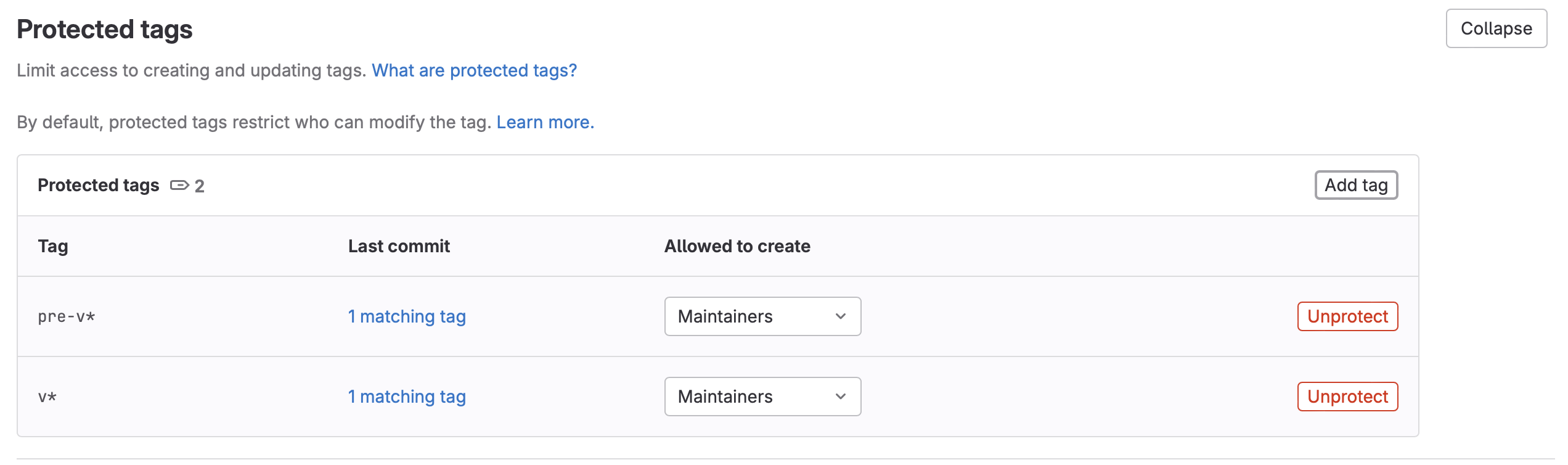
In order to do so, go to the Settings of your repository, then in Repository > Protected tags. Click on Add tag and protect the tags matching pre-v*. Then add a new tag and protect the tags matching v*.
Modify .gitlab-ci.yml
If you have followed the first tutorial, your repository should contain a file .gitlab-ci.yml which looks like this:
stages:
- build

variables:
  PROJECT_NAME: foo-project

  # Variables for metadata generation that will be used by the script `create_cff`
  CREATORS_LOCATIONS: codemeta.json
  CODEMETA_LOCATION: codemeta.json
  # Location where the CFF file will be generated
  CFF_PATH: CITATION.cff

include:
- local: .gitlab/ci/cff.gitlab-ci.yml
We will now add a stage release that will contain the release jobs, and add some variables that will be used in this jobs.
We will also include the configuration file of the release jobs that we will create as .gitlab/ci/release.gitlab-ci.yml:
stages:
- build
- release

variables:
  PROJECT_NAME: foo-project

  # Variables for metadata generation
  CREATORS_LOCATIONS: codemeta.json
  CODEMETA_LOCATION: codemeta.json
  # Location where the CFF file will be generated
  CFF_PATH: CITATION.cff

  # Variables for releases
  RELEASE_TAG: ${CI_COMMIT_TAG}
  RELEASE_API_URL: ${CI_API_V4_URL}/projects/${CI_PROJECT_ID}/releases
  RELEASE_ARCHIVE_URL: ${CI_PROJECT_URL}/-/archive/${CI_COMMIT_TAG}/${PROJECT_NAME}-${CI_COMMIT_TAG}.tar.gz
  RELEASE_DESCRIPTION: |
    Find the changelog [here](${CI_PROJECT_URL}/blob/master/CHANGELOG.md).

include:
- local: .gitlab/ci/cff.gitlab-ci.yml
- local: .gitlab/ci/release.gitlab-ci.yml
Create the file gitlab/ci/release.gitlab-ci.yml
Now we create the file gitlab/ci/release.gitlab-ci.yml containing the release jobs with the following content:
prepare-release:
  image: python:3.11
  stage: release
  rules:
  - if: $CI_COMMIT_TAG =~ /^pre/
  before_script:
  - pip install FACILE-RS
  - git config --global user.name "${GITLAB_USER_NAME}"
  - git config --global user.email "${GITLAB_USER_EMAIL}"
  script:
  - VERSION=`echo $CI_COMMIT_TAG | grep -oP '^pre-\K.*$'`
  - echo "Preparing release of $VERSION"
  - facile-rs release prepare --version=$VERSION
  - facile-rs cff create
  - git add ${CODEMETA_LOCATION} ${CFF_PATH}
  - git commit -m "Release ${VERSION}"
  - git push "https://PUSH_TOKEN:${PRIVATE_TOKEN}@${CI_REPOSITORY_URL#*@}" "HEAD:${CI_DEFAULT_BRANCH}"
  - git tag $VERSION
  - git push "https://PUSH_TOKEN:${PRIVATE_TOKEN}@${CI_REPOSITORY_URL#*@}" --tags

release-create:
  stage: release
  image: python:3.11
  rules:
  - if: $CI_COMMIT_TAG =~ /^v/
  before_script:
  - git config --global user.name "${GITLAB_USER_NAME}"
  - git config --global user.email "${GITLAB_USER_EMAIL}"
  - pip install FACILE-RS
  - export DEBIAN_FRONTEND="noninteractive"
  - apt update
  - apt-get install -y jq
  script:
  - facile-rs gitlab publish --release-description "$RELEASE_DESCRIPTION" --private-token "$PRIVATE_TOKEN"
Create your first release
Now that the CI pipeline is configured, we can trigger the creation of a release.
In the menu, go to Code > Tags.
Click on New tag.
As tag name, choose pre-v* where * is replaced by your software version identifier (
pre-v0.0.1in our example).Click on Create tag.
 .
.
The creation of this “pre-tag” will trigger the CI job prepare-release which will:
update the metadata files for the release (version number, date of the release,…)
Create a tag for the release (In our example,
v0.0.1)

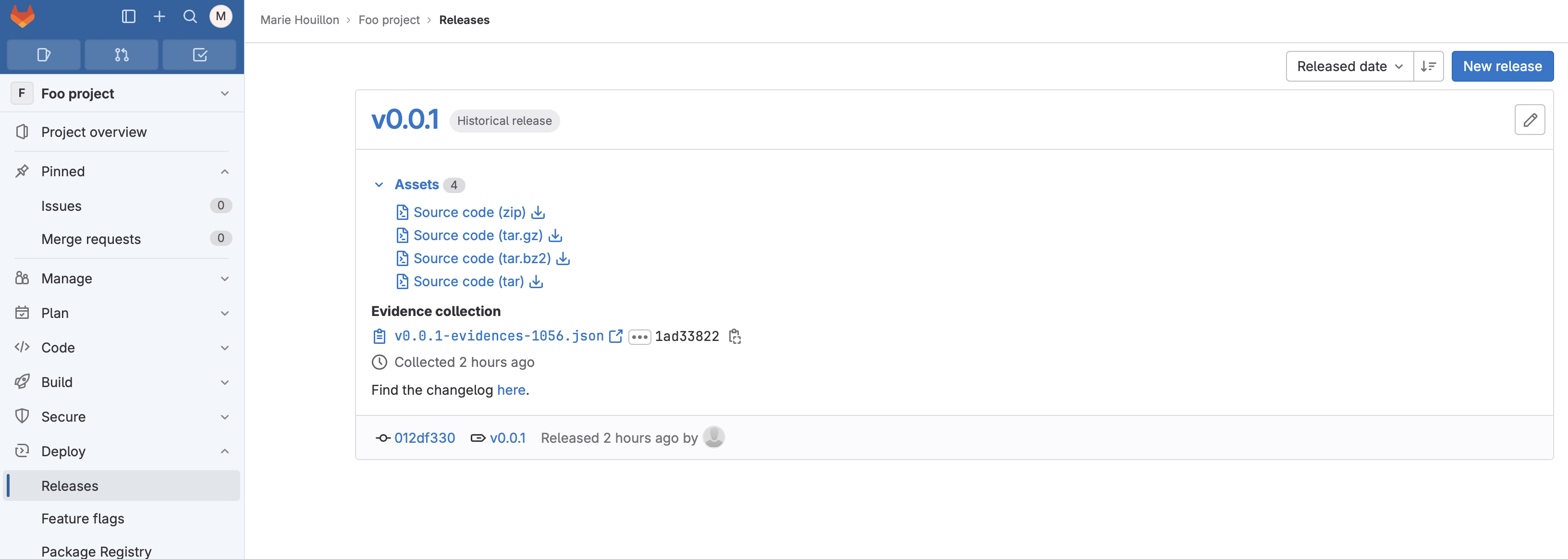
From the release tag, the CI job release-create will be triggered, and this job will create a GitLab release of your software.